Scheduling in Software Project Management is the process of mapping the project’s activities onto a calendar. It ensures that tasks are executed in the correct sequence, resources are assigned efficiently, and deadlines are realistic.
A schedule acts as the “roadmap” for the development team and the “promise” to the stakeholders.
1. The Core Components of a Schedule
To build an effective schedule, a project manager needs four primary inputs:
- Tasks: Derived from the Work Breakdown Structure (WBS).
- Durations: Estimated time for each task (hours, days, or weeks).
- Dependencies: The logical relationship between tasks (which task must finish before the next can start).
- Resources: The people, hardware, and software tools available to do the work.
2. Scheduling Techniques
A. Gantt Charts
The most common tool for scheduling. It provides a horizontal bar chart that represents the project timeline. It allows managers to see the start and end dates of every task at a glance.

B. PERT (Program Evaluation and Review Technique)
PERT charts are network diagrams that represent the flow of tasks. They are particularly useful for identifying the Critical Path and understanding the relationships between complex, concurrent tasks.
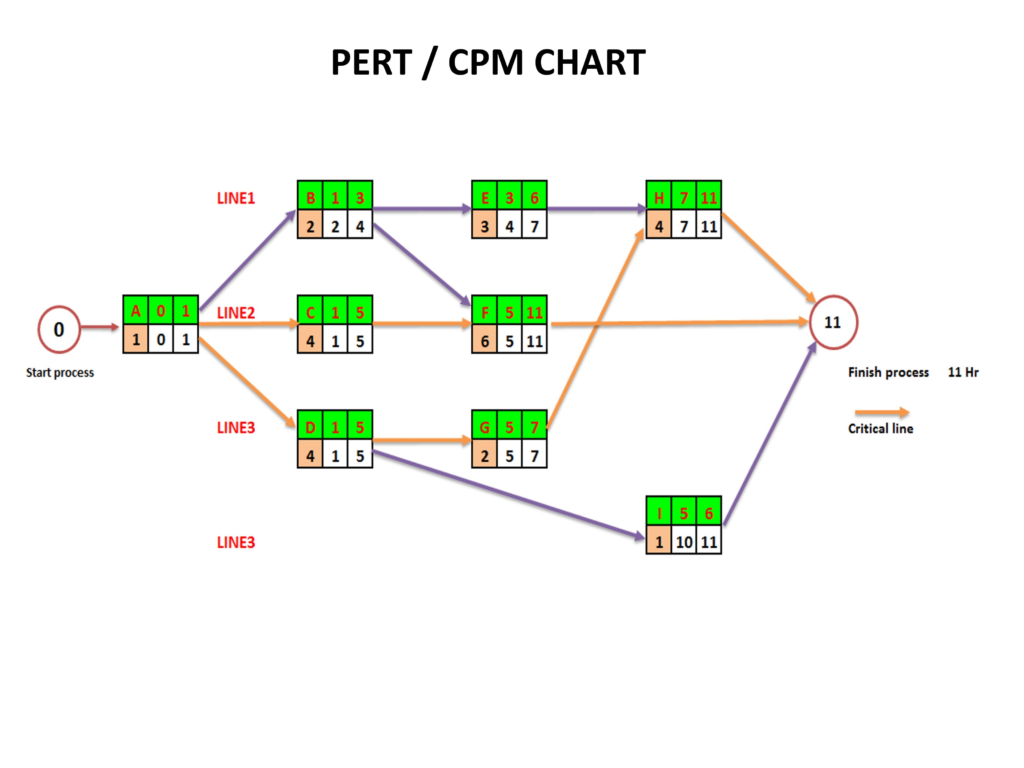
C. CPM (Critical Path Method)
The Critical Path is the longest path of planned activities to the end of the project. Any delay in a “critical” task results in a delay of the entire project.
- Total Float (Slack): The amount of time a non-critical task can be delayed without affecting the project completion date.
3. Principles of Software Scheduling
Scheduling software is uniquely difficult because “intellectual work” is harder to quantify than physical labor. Effective scheduling follows these principles:
- Compartmentalization: Break the project into manageable modules and tasks.
- Interdependency: Identify which tasks can run in parallel and which are blocked by others.
- Time Allocation: Every task must have a start and end date, but also a “buffer” for unforeseen bugs or technical hurdles.
- Effort Validation: Ensure that the scheduled hours do not exceed the team’s total capacity (e.g., you cannot schedule 60 hours of work for one person in a 40-hour week).
4. Resource Leveling vs. Resource Smoothing
When creating a schedule, you will often find that resources (like a Senior Backend Developer) are over-allocated.
- Resource Leveling: Adjusting the start and end dates of tasks based on resource constraints. This often extends the project deadline to prevent burnout.
- Resource Smoothing: Adjusting the schedule so that the resource requirements do not exceed certain predefined limits. Unlike leveling, the project completion date is not delayed.
5. Tracking the Schedule
A schedule is a living document. Project managers use specific metrics to track health:
- Milestones: Significant points in time (e.g., “Beta Version Complete”). They have zero duration and act as checkpoints.
- Variance Analysis: Comparing the planned progress against the actual progress.
- Timeline Slip: The amount of time the project has moved past its original baseline.
Why Schedules Fail in SPM
- Underestimating Complexity: Assuming a new technology will be easy to implement.
- Omitting Tasks: Forgetting to schedule time for testing, documentation, or client feedback.
- The “Human Factor”: Not accounting for vacations, sick leave, or the learning curve of new team members.